
Some vulnerabilities are practically furniture. SSL weak cipher suites. Missing security headers. Insufficient account lockout policies. SMBv1 still enabled on a file server. If you have been doing vulnerability assessments for more than a few months, you have written up the same handful of findings so many times you could do it from memory.
The problem is that writing from memory produces inconsistent output. The description you wrote for SSL cipher issues in January uses different language than the one you wrote in March. The severity rating you assigned last quarter might not match the one you assign this quarter. The remediation guidance varies depending on how much coffee you had when you wrote it. Across a body of work, that inconsistency is visible, and it raises questions you would rather not have to answer.
A vulnerability finding library solves this by separating the writing from the work. You write a finding once, store it with its severity rating and remediation guidance, and pull it into future engagements rather than starting over. The finding gets better over time as you refine it. Every report that uses it is consistent with every other report that uses it.
What belongs in a finding library
The candidates for library entries are the findings you encounter repeatedly across different clients and environments. The specifics vary, but the underlying vulnerability, its description, its business impact, and the remediation steps are largely the same every time.
SQL injection, cross-site scripting, weak authentication configurations, missing patch management, unencrypted sensitive data in transit, insecure default credentials: these are the bread and butter of most assessment work. Writing each one up carefully once, with a clear description, a well-framed business impact statement, and actionable remediation guidance, is worth the time. Writing each one up from scratch on the fifteenth engagement is not.
Library entries do not replace analyst judgment. When you pull a finding from the library, you still adjust the affected systems, confirm the severity is appropriate for this environment, and add any context specific to the client. The library provides the foundation. The analyst provides the context.
Building the library from your existing work
The most efficient approach is to build the library incrementally from engagements rather than trying to build it upfront. When you encounter a finding worth keeping, you save it to the library from the finding detail view.
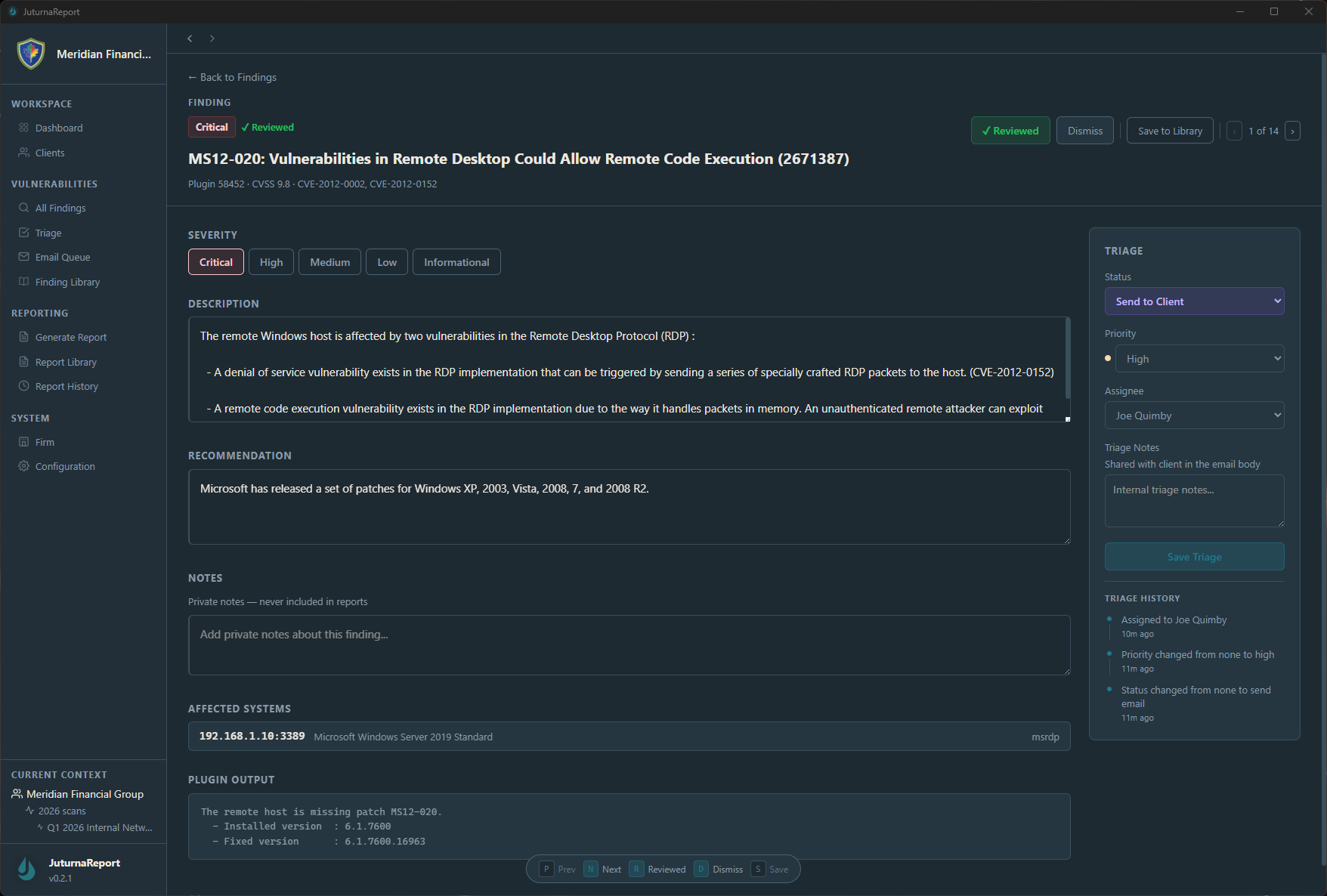
The Save to Library action captures the finding as it stands at that point in your triage: the description, recommendation, and severity rating you have already assigned. After a few engagements, the library reflects the findings you actually see in practice, written the way you actually want to present them, at the severity levels you have calibrated through real assessments.
This is meaningfully different from trying to build a library from scratch in a quiet moment between projects. That approach requires you to anticipate which findings you will encounter, which is guesswork. The incremental approach builds from evidence.
Using the library on a new engagement
Once the library has entries, the workflow on a new engagement changes. When a scan returns a finding type you have documented before, you pull the library entry into the triage view and adjust it for the current environment rather than writing from scratch.
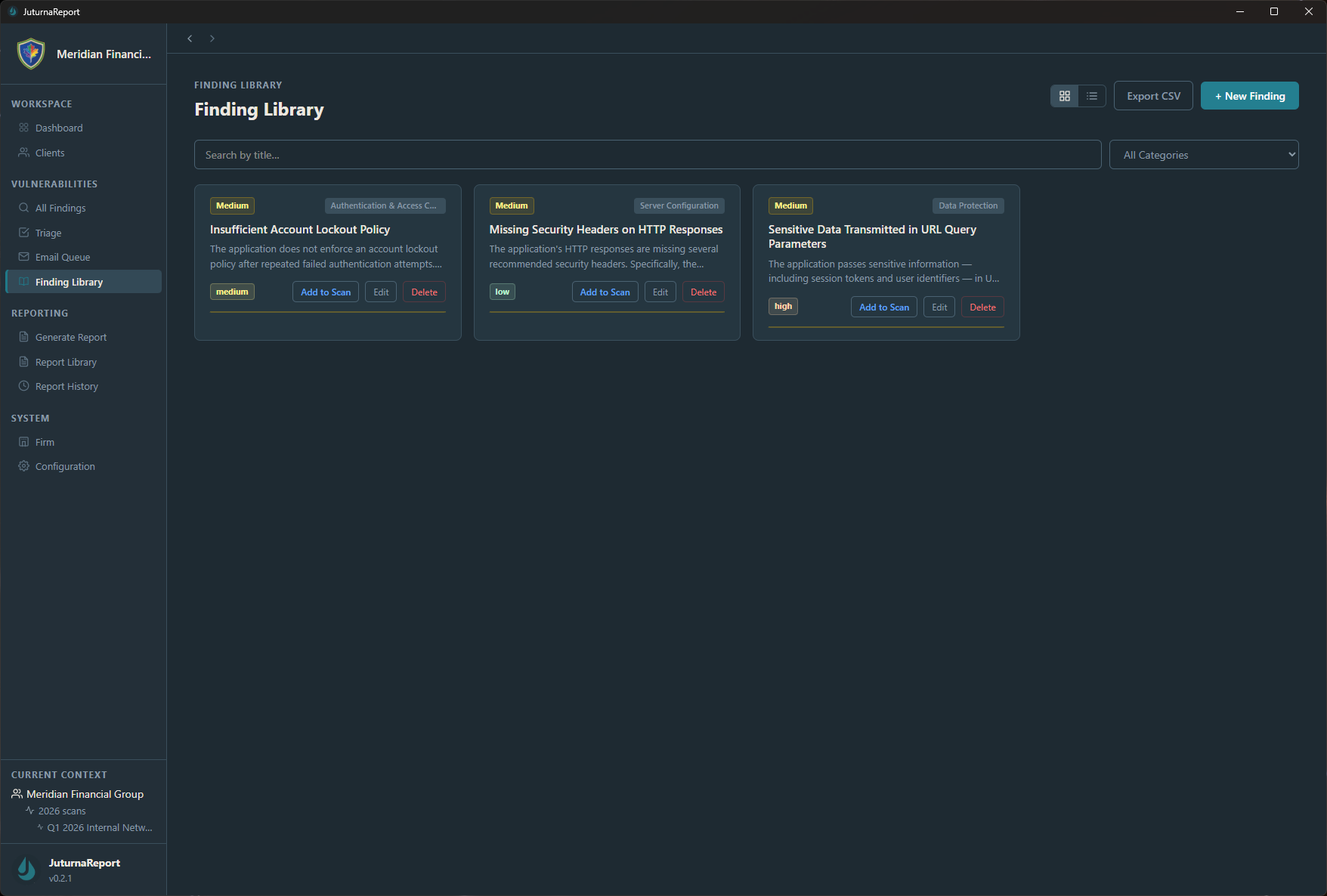
The Add to Scan action pulls the description and remediation guidance from the library entry into the current engagement’s finding. The severity carries over as the library default, though you can adjust it during triage if the current context warrants it. The preview lets you review the entry before adding it, which matters when your library has multiple entries for similar finding types.
Over time, the library becomes one of the more valuable assets in your workflow. A consultant two years into building a library has documented dozens of finding types with calibrated severity ratings and remediation guidance refined across many real engagements. That is institutional knowledge with a structure that survives past any single project.
What consistency actually buys you
The practical benefit of a finding library is time. The less obvious benefit is credibility.
When a client receives two vulnerability assessments from you a year apart, and the finding descriptions use consistent language, the severity ratings follow a clear framework, and the remediation guidance is specific and actionable in both reports, that consistency signals that your process is repeatable and your judgment is calibrated. It is the difference between work that looks like a practice and work that looks like a one-off effort.
When a different analyst on your team picks up an engagement and uses the same library, the output is consistent with what the client received last time, regardless of who wrote it up.
The finding library in JuturnaReport is built into the triage workflow rather than maintained as a separate document. Library entries are available from the finding detail view on every engagement, and additions to the library are immediately available across all current and future work. It runs locally with the rest of the application, no separate database or shared drive required. Early access pricing starts at $49/year at /pricing/.